
Workshop management
See every job, every bay, every technician – at a glance.
Running a workshop from memory and whiteboards works until it doesn’t. One double-booked bay, one forgotten job, one technician standing around waiting for parts that haven’t arrived – and your whole day unravels. Torqueflow gives you a live view of your entire workshop so you always know what’s happening and what’s coming next.
What it does
Torqueflow’s workshop management is built around two views: a kanban board showing every job’s status, and a scheduler showing your bays and time slots. Around them sit the parts catalog, supplier records, time-tracking kiosk, holiday booking, customer data quality tools, and the multi-location dashboard if you run more than one site.
Every part of the workshop talks to every other part. Move a job, and the customer text fires. Tag a tyre, and the disposal levy lands on the invoice. Clock in at the kiosk, and the timesheet builds itself.
Why this matters
Monday morning and the whiteboard already disagrees with the diary.
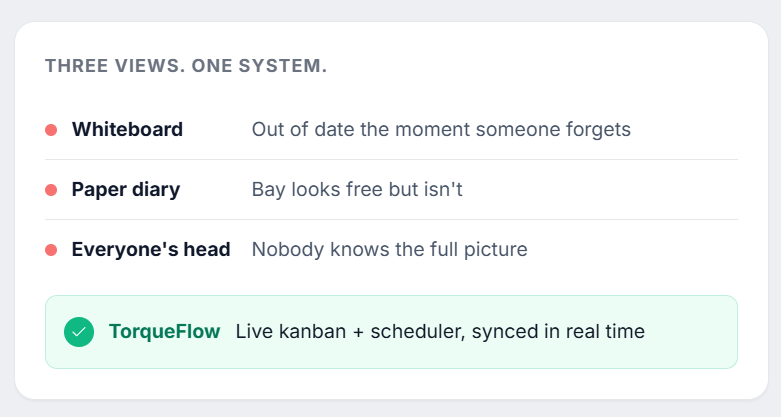
You know the drill. Steve walks in Monday morning and the whiteboard says one thing, the diary says another, and Dave’s already started on a job that was supposed to wait for parts. Chloe’s fielding calls about cars she can’t see in the system. Half the day’s gone before anyone’s actually productive.
The problem isn’t your team – it’s that everyone’s working from different information. The whiteboard’s out of date the moment someone forgets to update it. The paper diary doesn’t tell you if a bay is actually free or just looks free.
Torqueflow puts everyone on the same page. One source of truth, updated in real time, visible to everyone who needs it.
Jobs and the workshop floor
Kanban board
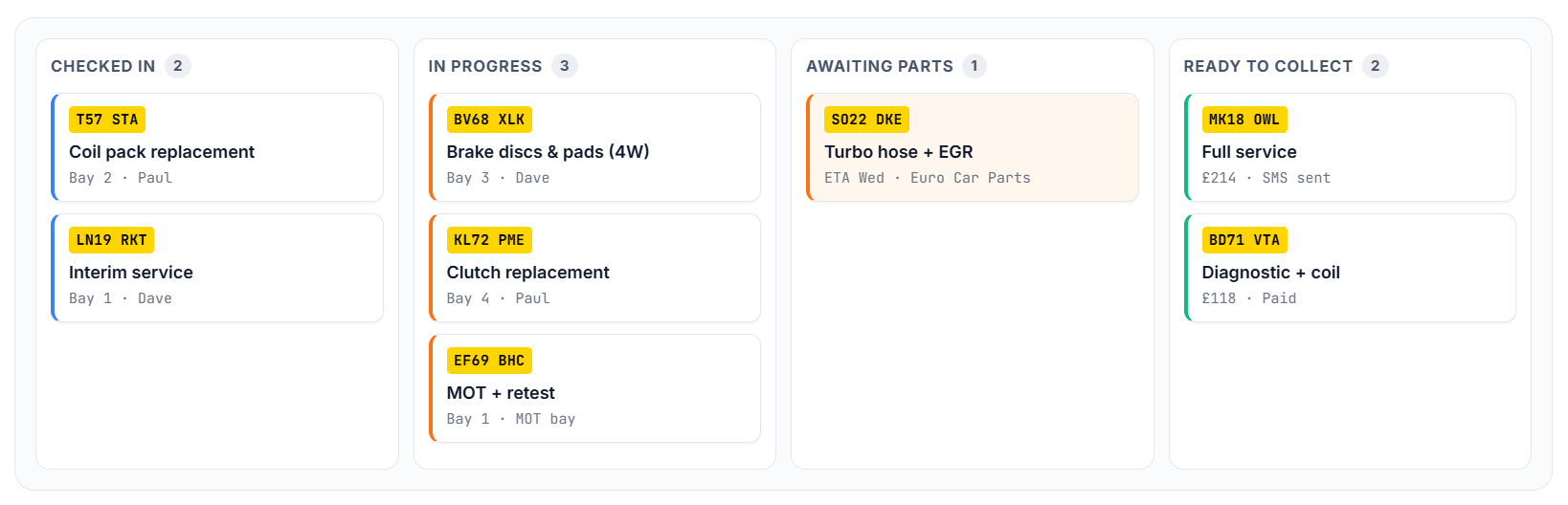
Every job is a card. Every stage is a column.
Every job in your workshop appears as a card on the kanban board. Cards move through columns as work progresses – from booked, to checked in, to in progress, to awaiting parts, to quality check, to ready for collection.
At a glance
Know where your bottlenecks are before they cost you the afternoon.
Click into any card for the full picture – vehicle details, work items, technician assignment, parts status, customer notes, photos.
Configurable workflow statuses
Your workshop doesn’t work like every other workshop.
Maybe you have a “sublet out” stage for specialist work. Maybe you split “in progress” into “diagnostics” and “repair.” Maybe you need a “customer contacted” step before collection.
Add, rename, reorder, and colour-code the columns to match how your garage actually operates. No forcing your process into someone else’s template.
Bay scheduler with drag-and-drop
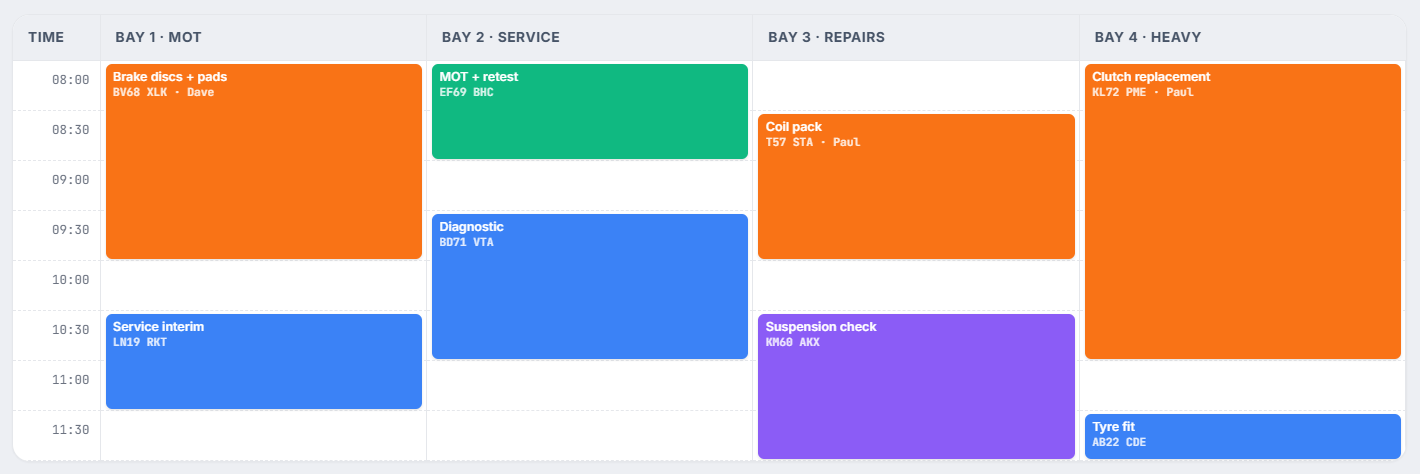
Every bay is a lane. Every job is a block.
The scheduler shows your workshop as a calendar with bays as columns. Each bay is a vertical lane, and jobs slot into time blocks throughout the day.
Switch between day, week, and multi-week views. Zoom in on today’s detail or zoom out to plan next week.
Drag-and-drop scheduling
Move a job to a different bay? Drag and drop.
Rescheduling from Tuesday to Wednesday is a drag-and-drop. Swapping two jobs between bays is two drag-and-drops. No re-entering data. No crossing things out and rewriting them.
When you move a job, all the linked information follows – technician assignment, parts allocation, customer notifications. Everything stays connected.
Vehicle presence tracking
Know exactly which cars are on your premises right now.
Torqueflow tracks whether a vehicle is physically on-site. When a customer drops off early, you mark the vehicle as present. When it’s collected, you mark it gone.
Technician job cards
Each technician has their own job card view – what they’re working on today, what’s next, what they need. From the job card, Dave can:
When you move a job, all the linked information follows – technician assignment, parts allocation, customer notifications. Everything stays connected.
Photos are particularly valuable. When Dave finds a corroded brake line, he photographs it from the job card. That photo is instantly available to Chloe for the customer quote, to the Voice AI if the customer calls, and to the customer portal if they’re checking online.
Checklist templates
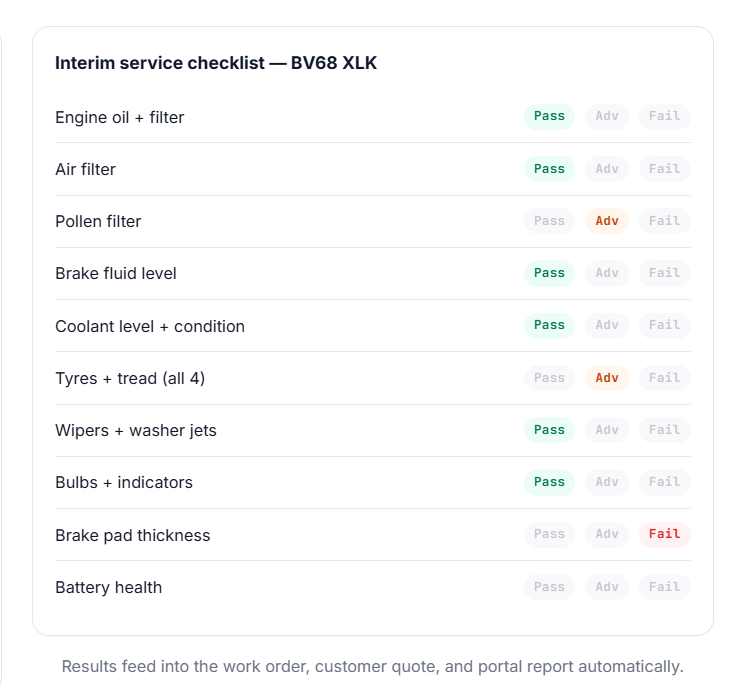
Create reusable inspection checklists for common jobs – MOT prep checks, interim services, full services, pre-purchase inspections, seasonal checks. Each checklist is a structured list of items to inspect, with pass/fail/advisory options and space for notes and photos. Run through it once, the results feed directly into the work order and the customer-facing report.
Parts & suppliers
One catalog. Every supplier. Every cost – kept current.
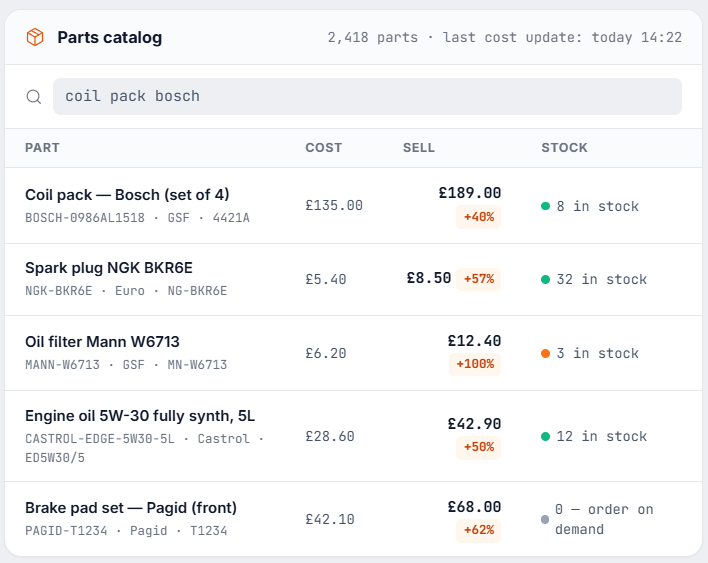
The parts catalog is your central record of every part you fit. Add a part once and it’s available everywhere – invoice line editor, work-order builder, AI scan matching. Costs update from purchase invoices automatically, so your next quote uses today’s price, not the price your supplier charged you eighteen months ago.
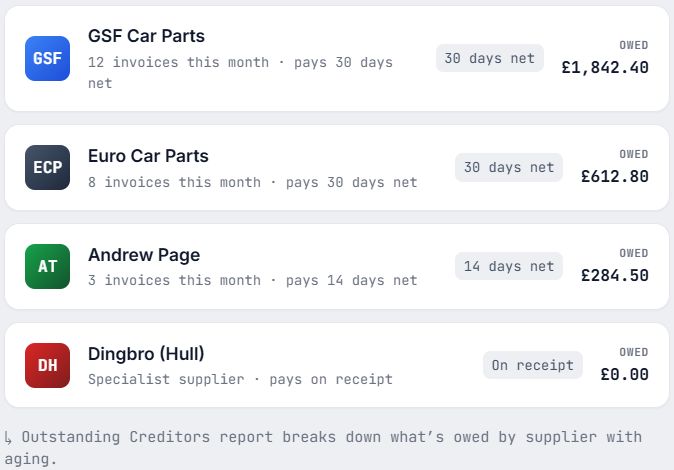
Suppliers, costs, and what you owe.
The parts catalog is your central record of every part you fit. Add a part once and it’s available everywhere – invoice line editor, work-order builder, AI scan matching. Costs update from purchase invoices automatically, so your next quote uses today’s price, not the price your supplier charged you eighteen months ago.
Costs flow everywhere
When you log a purchase invoice, parts on that invoice update their cost record automatically. Updated costs flow through to the technician commission report and the financial reports – so you can see exactly which job types are profitable and which are eating margin.
Stock and inventory
Today’s cost. Today’s margin. Not eighteen months ago.
Every part in the catalog tracks its cost from the supplier and the price you charge. When you log a purchase invoice, the parts on that invoice update their cost record automatically – so when you next quote that part, you’re working from current cost, not the price your supplier charged you eighteen months ago.
Costs flow through to the technician commission report and the financial reports, so you can see exactly which job types are profitable and which are eating margin.
Tracked against the part itself – not buried in a single invoice.
Log a purchase invoice and the cost on every line refreshes the catalog record.
Profitability per job type, not just blanket markup.
MOT-ready
MOTs are the heartbeat of an independent garage. We treat them like it.
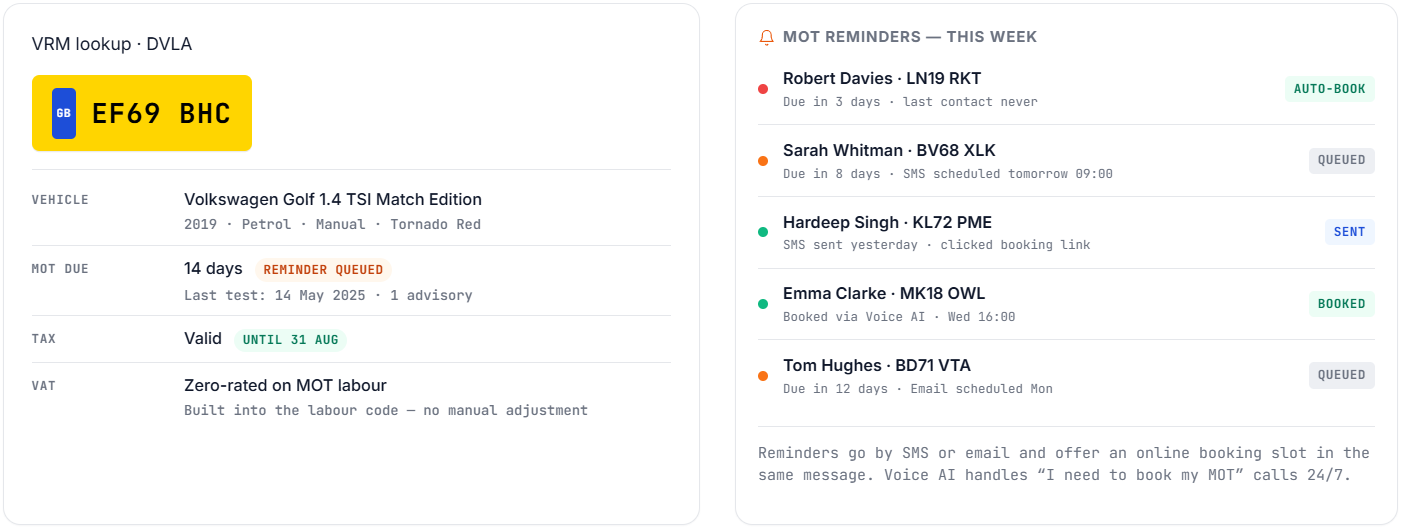
Type the registration; the rest fills itself in. MOT history, due dates, advisories and fail reasons live on every vehicle record – and reminders go out automatically at the interval you set.
Time, attendance, and pay
Clock in once. Pay reports build themselves.
Staff clock in at the wall tablet – or from their own job card if you’d rather. Every minute is logged against a specific work order, every job carries its labour cost, every invoice generates with the correct line.
Time-tracking kiosk
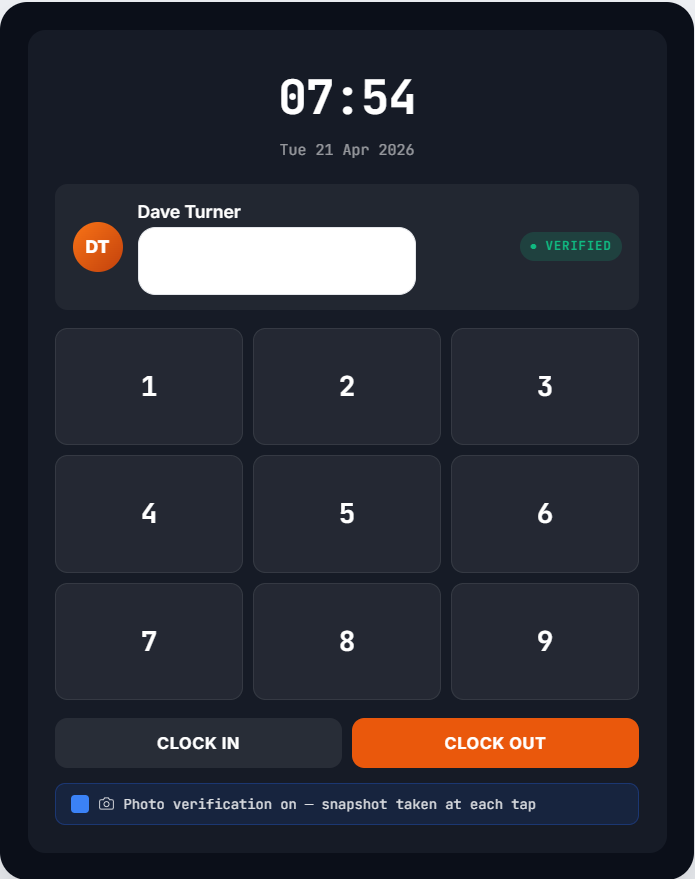
Tablet on the wall. PIN per technician. Optional photo verification.
The kiosk uses a PIN for each staff member and supports optional photo verification at clock-in and clock-out for organisations that need an audit trail.
Per-staff break and pay configuration
Mixed contracts? Mixed rates? No problem.
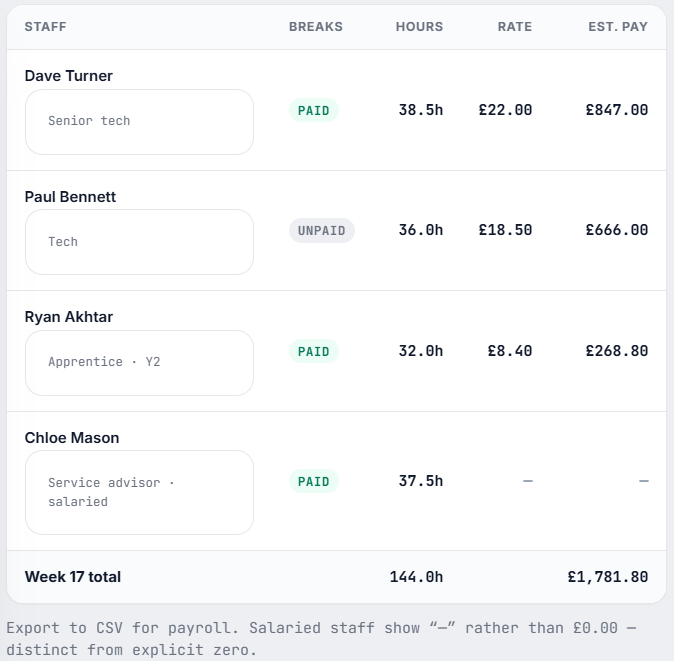
Some salaried, some hourly, apprentices on different rates from senior techs. Set a per-staff break override (paid or unpaid, overriding the org-wide default) and an hourly pay rate per staff member. Staff without a configured rate show as “—” rather than £0.00 – distinct from explicit zero.
Holiday entitlement & absence
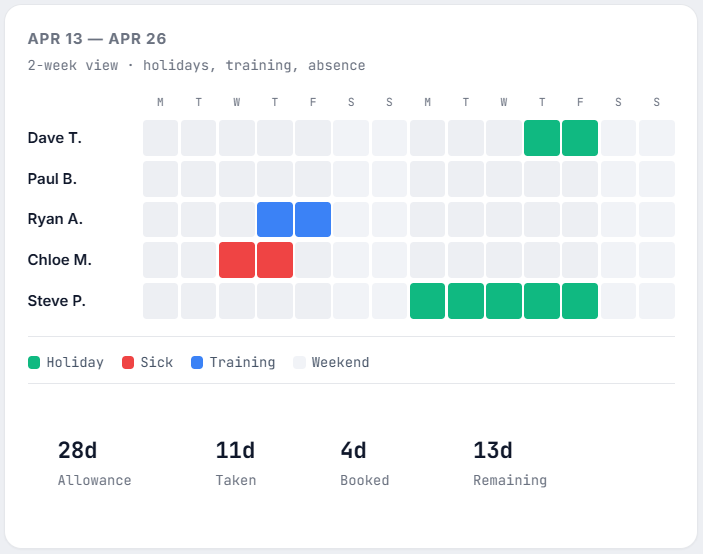
Allowance per staff. Calendar of who’s off when.
Track holiday allowance per staff member, log holidays and absences against a calendar, see who’s off when. Holiday hours flow into the time-tracking report so payroll calculations stay accurate.
Technician commission
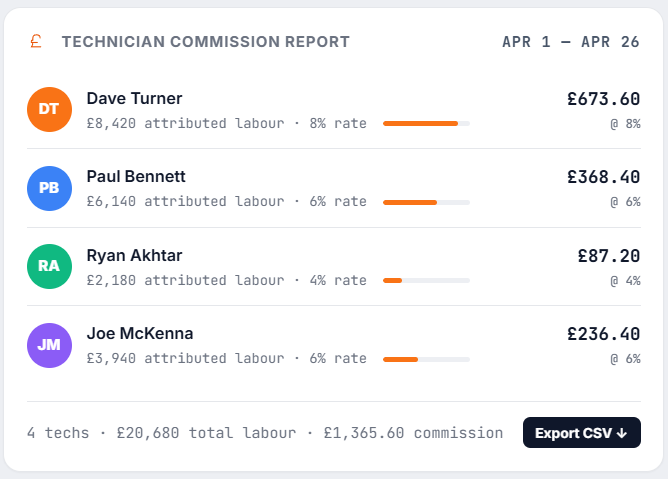
Per-tech labour attribution. Payroll-ready CSV.
Each invoice labour line carries the technician who did the work, even when multiple techs were on the same job (commission gets split evenly for fixed-price labour). Run the report, hand the CSV to your payroll process.
Fixed-cost labour pricing
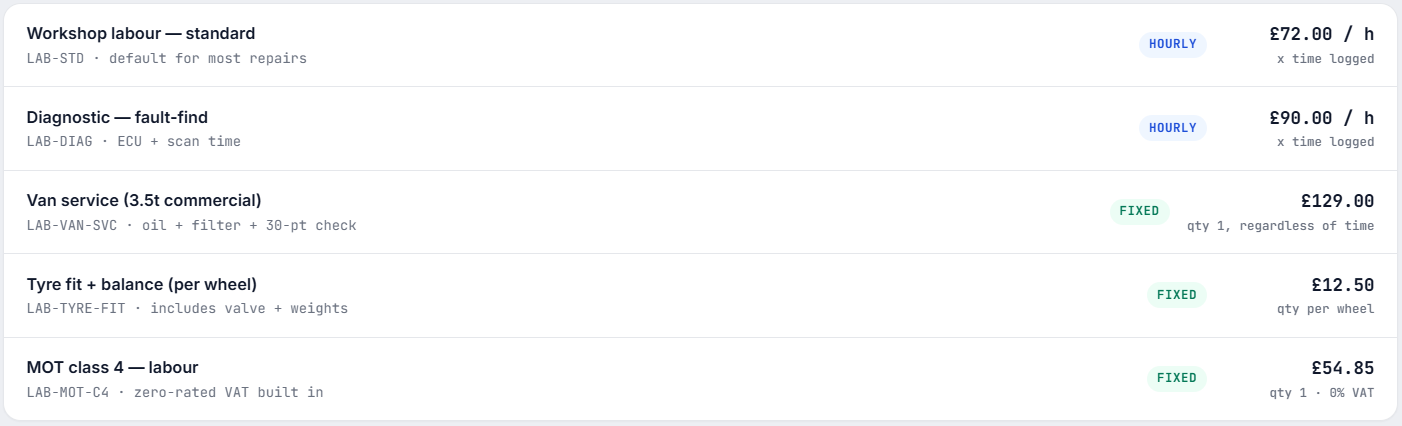
Not every job is hourly. Mix and match per code.
Configure labour codes as either hourly (rate × hours) or fixed price (e.g. “Van Service – £129”). Fixed-cost codes invoice as qty 1 at the configured price, regardless of time logged.
Customer records & data quality
Two records for the same person? Merge them – properly.
Customer records get duplicated. Walk-in vs phone-call entries, Techman imports vs hand-typed records, “Mr Smith” vs “M. Smith.” A nightly scan flags the pairs that look like the same person. The merge tool combines two records into one with a side-by-side cherry-pick of every field.
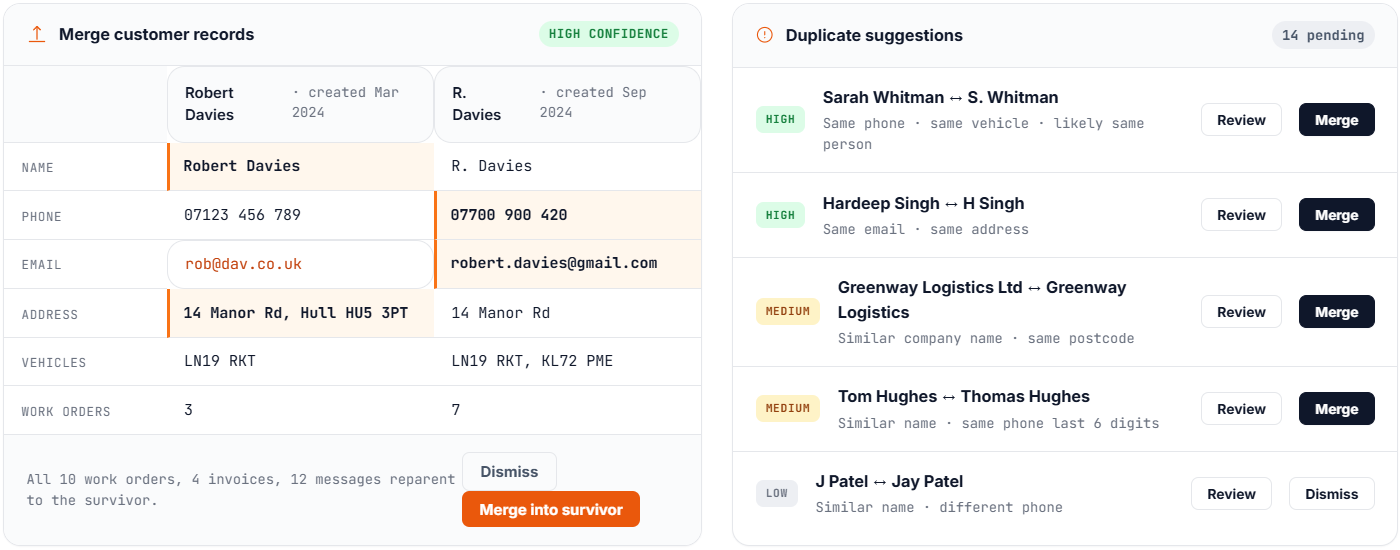
Sometimes the right answer is delete, not merge. The Delete flow checks for active work orders, unpaid invoices, and active conversations first, blocks the delete if any are present, and runs a 30-second undo if you change your mind. Historical paid invoices stay on file regardless – HMRC retention is respected.
Multi-location
Run more than one site? Torqueflow handles it natively.
Each location has its own bays, its own scheduler, its own technicians, its own kiosk. Owners get a unified dashboard rolling everything up. Per-location reports, per-location billing, per-location branding (subdomains, phone numbers, logos).
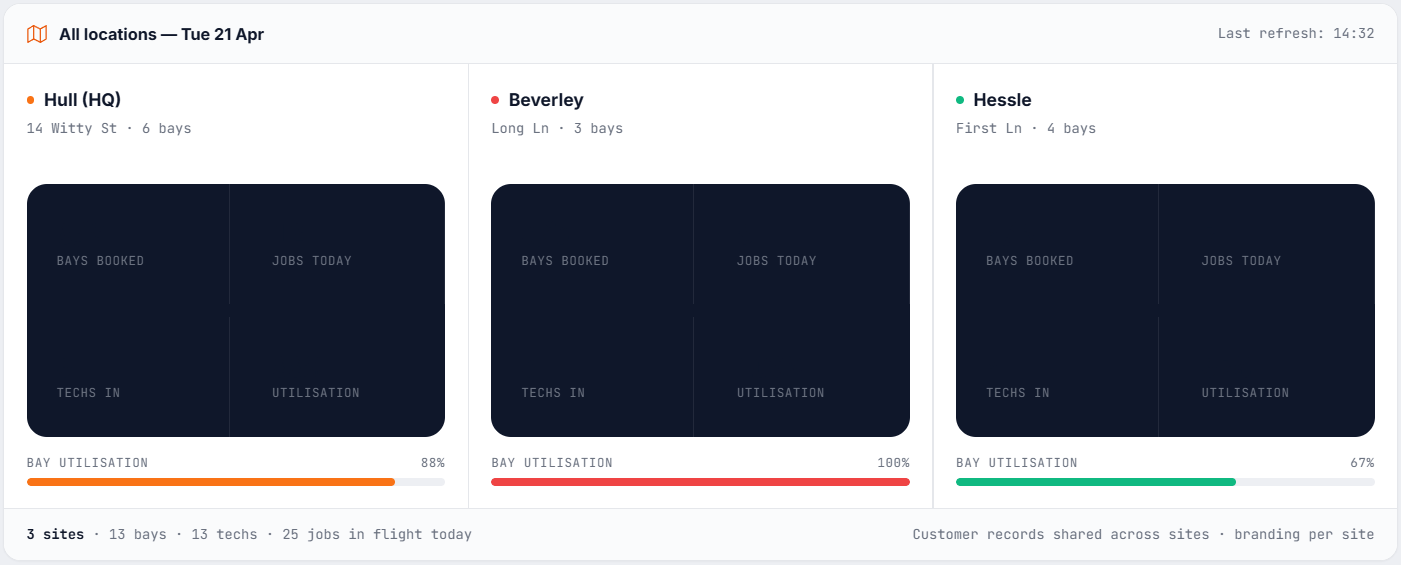
Adding bays at any location auto-syncs to your subscription quantity, so you don’t get double-billed or under-billed when you grow or shrink.
Subdomains, phone numbers, logos. Customer at one branch doesn’t get treated as a stranger at another – records are shared.
The 20-bay-per-location cap is a UI choice (keeps the scheduler readable). Multi-location garages can have far more bays in total across sites.
The real difference
One action. Multiple outcomes.
The kanban board isn’t just a task tracker – it feeds your Voice AI, your customer portal, your invoicing, and your reports.
Dave moves card to Complete
SMS fires to customer
Invoice starts generating
Voice AI says “yes, ready”
FAQS
The rest of what owners ask us.
Quick summary
The one-page version.
|
What |
How |
|---|---|
|
Workshop overview |
Kanban board with live job status |
|
Workflow stages |
Fully configurable to match your process |
|
Bay scheduling |
Calendar view, drag-and-drop, day/week/multi-week |
|
Vehicle tracking |
On-site presence logged for every vehicle |
|
Technician view |
Individual job cards with photo capture and time logging |
|
Inspection checklists |
Reusable templates for common job types |
|
Parts catalog |
Central part records, AI-match-ready |
|
Supplier management |
One supplier record, syncs to Xero |
|
Time tracking + kiosk |
PIN-based clock in/out, optional photo verification |
|
Per-staff pay config |
Break override + hourly rate, used in payroll exports |
|
Holiday entitlement |
Allowance tracking, absence calendar |
|
Commission reporting |
Per-tech labour attribution, payroll-ready CSV |
|
Fixed-cost labour |
Hourly OR flat-price labour codes |
|
Customer dedup |
Manual merge + automatic duplicate suggestions |
|
Customer deletion |
Safeguarded delete with 30-second undo |
|
Multi-location |
One account, per-site bays / scheduling / branding |
One source of truth.
Visible to everyone who needs it.
Start free. See the board light up with your own jobs, your own bays, your own team.