
Garage Invoicing Software for UK Independents
Garage invoice software that handles quotes, invoices, payments and VAT – properly.
You didn’t open a garage to do bookkeeping. But sloppy finances mean chasing payments, VAT surprises and hours lost to spreadsheets. Torqueflow is garage invoice software built for the UK motor trade. It runs the money side cleanly, so you can see where your cash is, who owes you and what you owe. No bookkeeper required.
This isn’t a generic invoicing tool with a garage logo on it. Every invoice knows the job behind it: the vehicle, the parts used, the labour time, the VAT. Type a reg and it pulls the car and its MOT history. Finish the work and the invoice is already half written.
From work orders
Online & at the desk

Two-way, live
Bills, parsed
Quarterly ready
What it does
Torqueflow runs the money side of your garage from quote to payment to ledger. Sales and purchase invoices generate from the work itself. Customers pay online by card or in person on a card terminal. Supplier bills get scanned in by the AI instead of typed by hand. Everything syncs to Xero, so your accountant sees the same numbers you do.
The invoicing software sits at the centre of a full garage management system. The booking diary, job cards, MOT reminders, parts and stock all live in the same place. This page covers the finance side. See the workshop side here.
Why this matters
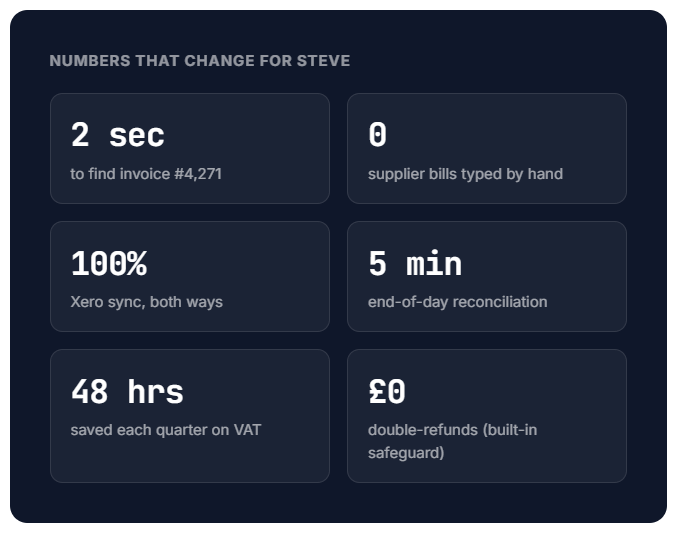
Here’s a common Monday for Steve.
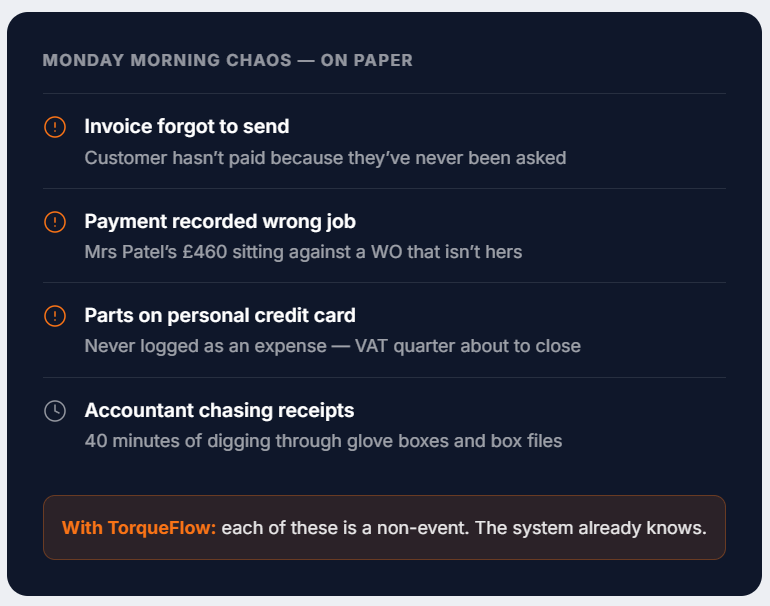
He’s trying to work out why last month’s figures don’t add up. There’s an invoice he forgot to send. A payment that came in but never got recorded against the right job. A parts order sitting on his credit card statement that never made it into the accounts.
The problem isn’t that Steve’s bad with numbers. It’s that his setup, a mix of paper invoices, a spreadsheet and whatever his accountant asks for at year-end, has too many gaps for things to fall through.
Torqueflow closes those gaps. Invoices generate from work orders. Payments record against the right customer. VAT calculates automatically. When Steve wants to know how last month went, he pulls a report instead of digging through paperwork. It cuts the admin and protects his cash flow.
↳ Money coming in
Quote, invoice, get paid – without retyping anything.
When a job is complete, an invoice generates from the work order. The customer pays online or at the desk. The payment lands back against the invoice. No reconciliation marathon at month-end.
01 – Sales invoices
From completed job to branded invoice in one click.
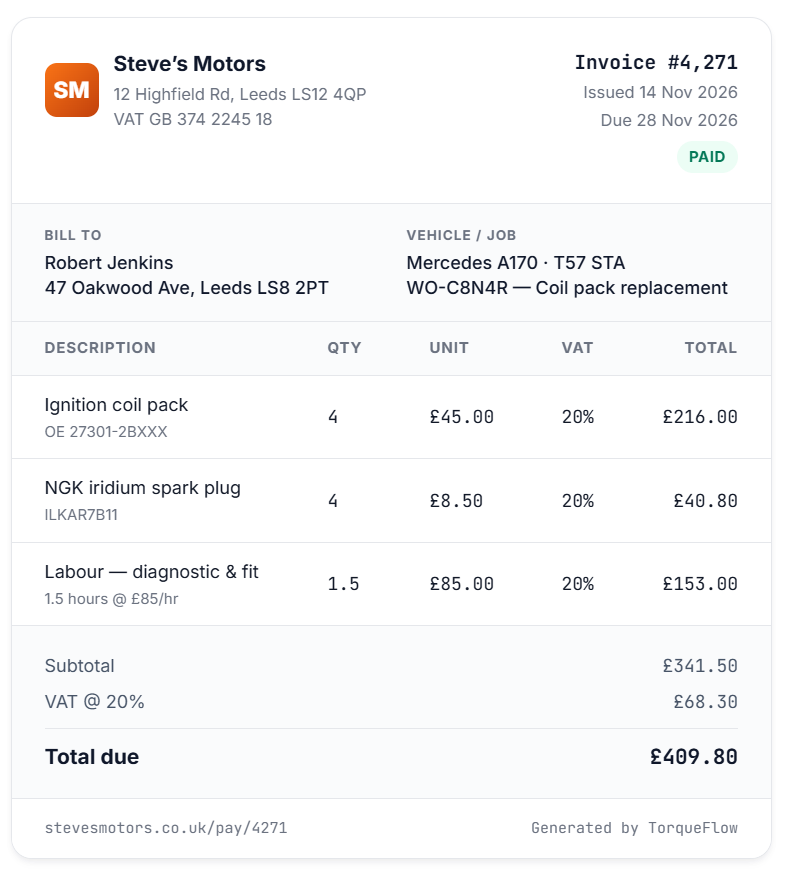
When a job’s complete, Torqueflow generates a sales invoice straight from the work order (your job card). Labour time, parts used, discounts and VAT are all itemised, all calculated, all branded to your garage. Email it, print it, or send it to the customer’s portal. Once it’s paid, the PDF re-labels itself as a Receipt automatically.
Type the vehicle registration (VRM) and the lookup pulls the car straight from DVLA, so the registration number, make and model land on the invoice without retyping. No more transposed digits on the paperwork.
Dual-copy PDFs
Prefer to hand over a printed invoice with a customer copy and an office copy? Switch on dual-copy PDFs in Settings. Staff downloads then produce a two-page PDF, one badged “Customer Copy” and one “Office Copy”. Portal customers still get a single clean copy.
02 – Online & in-person payments
Stripe Pay Now in their inbox. TakePayments terminal at the desk.
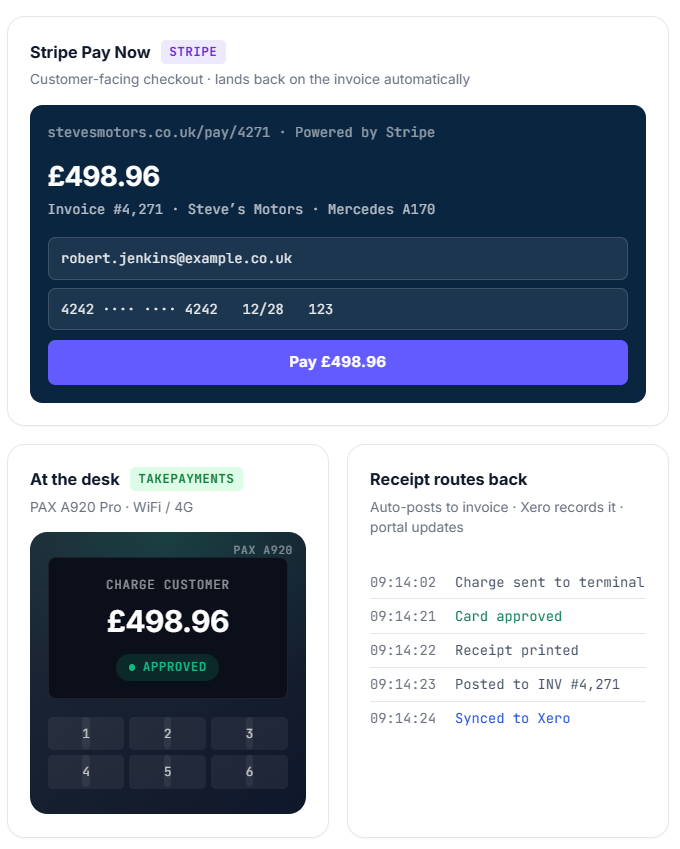
Connect Stripe in a few clicks and add a Pay Now button to every invoice. Send the customer a payment link by email and SMS. They tap it, pay on Stripe-hosted checkout, and the payment lands back against the invoice. No retyping, no reconciling. Billing several invoices at once? Send a statement payment link that settles them all and allocates oldest first.
For payments at the front desk, TakePayments card terminals (the PAX A920 Pro or Ingenico Move 5000) work over WiFi or 4G straight from your TakePayments merchant account. Charge an invoice in Torqueflow, the terminal prints the receipt, the payment posts itself.
Learn more about online payments and card terminal setup.
Statement payment links
Bill several invoices in one go – a single link pays them all and allocates oldest first.
03 – Customer statements
Per-customer or all-outstanding, in one click.
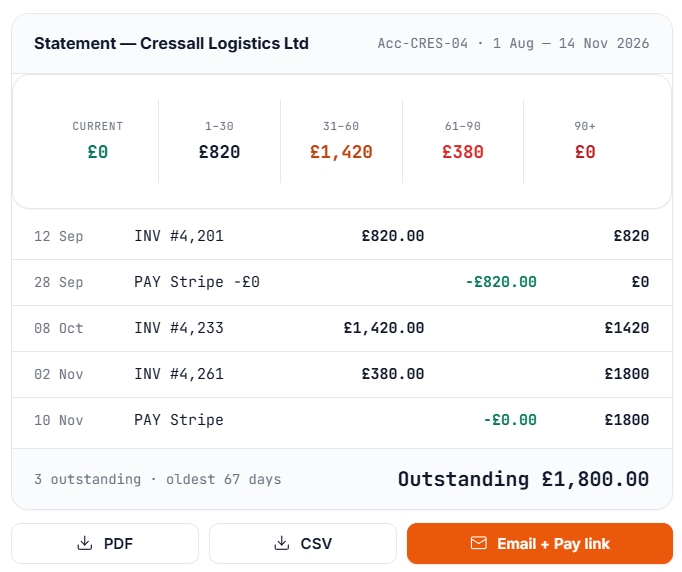
Generate a per-customer statement showing every invoice and payment in a date range, plus aging buckets (Current / 30 / 60 / 90 / 120+). Download as PDF, export as CSV, or email it to the customer with the PDF attached.
There’s a bulk All Outstanding view too – one click, every customer with money owed. Pair it with a statement payment link and they can settle the lot in a single Stripe checkout.
04 – Credit notes & voids
Mistakes happen. Refunds and reversals leave a clean trail.
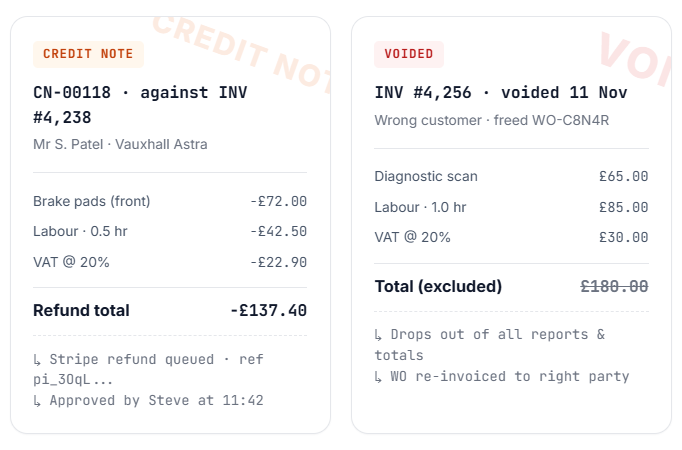
When you owe a customer money back, issue a credit note for specific lines or quantities. If they paid by Stripe, refund their card in the same step. The credit note carries its own number, its own PDF and its own audit trail. Voiding a credit note adjusts the books but never reverses a Stripe refund, so you can’t accidentally double-refund.
Created the wrong invoice? Wrong customer? Duplicate? Void it. Voided invoices stay on file with a “VOID” badge and watermark, drop out of every total and report, and free up the work order so you can re-invoice the right party. Once an invoice has any payment recorded, the void option disappears. Use a credit note instead. No accidents.
↳ Money going out
Stop typing supplier invoices in. Send them in instead.
Every supplier bill logged against the right supplier and the right job. AI extracts the lines, you review and confirm. Disposal levies and environmental fees apply themselves.
05 – AI purchase invoice scanning
Forward an email. Drop a PDF. Snap a photo.
Send supplier invoices straight to a dedicated <you>@scan.torqueflow.app address, drag-and-drop a PDF on the desktop, or snap a photo with your phone.
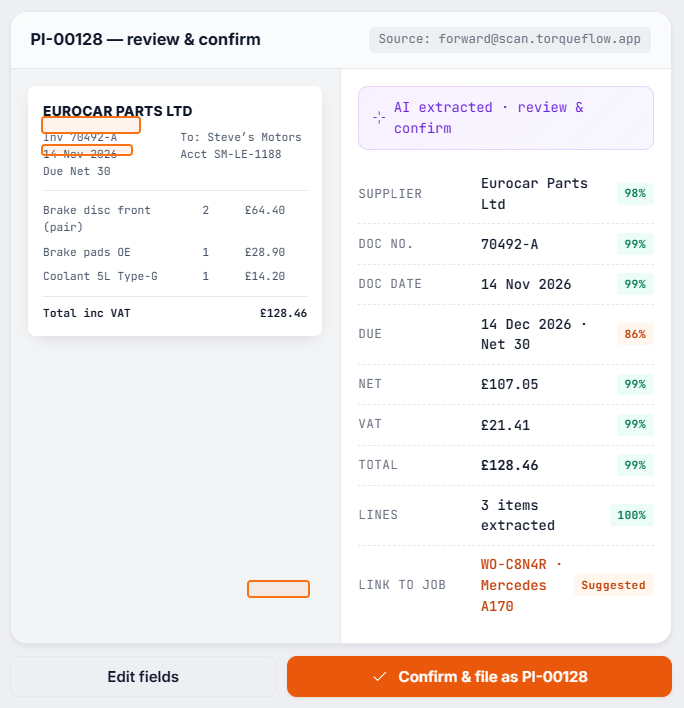
Torqueflow’s AI extracts the supplier, document number, dates, totals and every line item. You review on a side-by-side screen, source preview on the left, extracted form on the right, then Confirm. Suppliers and parts that aren’t in your records yet can be created from the same screen. It’s the difference between an evening of manual data entry and five minutes of checking, and that time saving adds up fast across a busy month. Learn more about invoice scanning.
Forward PDFs
Desktop upload
Phone capture
06 – Purchase invoices & disposal fees
Two columns, two trails – and levies that apply themselves.
Log every supplier bill against the right supplier and the right job. Each one gets an internal PI reference (like PI-00042) auto-assigned in your sequence, alongside whatever number the supplier put on their document. Two columns, two trails. Find any bill in seconds.
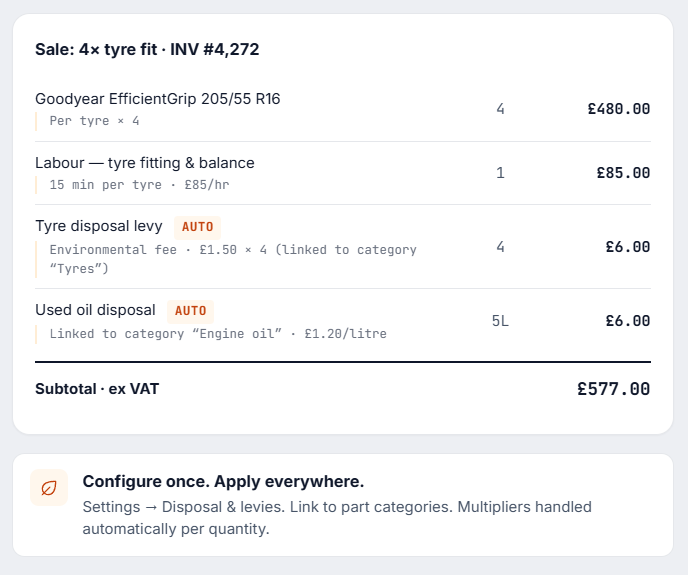
Tyre disposal, oil disposal, refrigerant levies. Configure them once in Settings, link them to a part category, and they apply automatically when you generate the invoice. Multi-tyre invoices get the right multiplier. The customer-facing description appears on the PDF as a smaller sub-line, so customers know what they’re paying for.
↳ Quotes & customer terms
Quote from a finding, or quote from scratch – and price it the way you actually price.
07 – Quotes from inspection findings
Findings become quote lines – with severity, photos, prices.
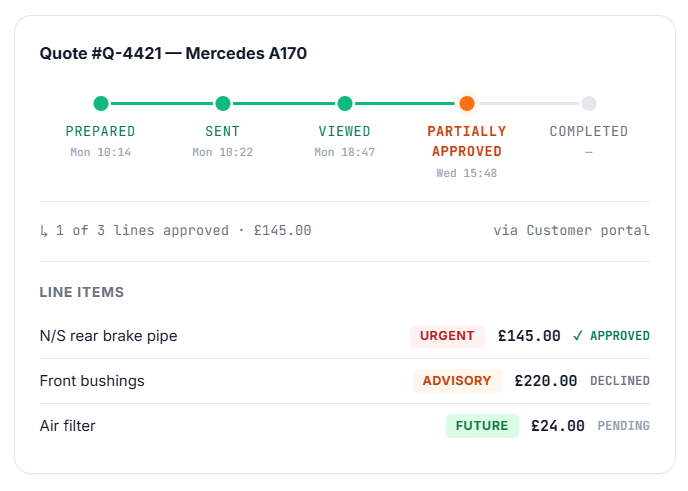
When Dave finds extra work during an inspection, those findings become quote lines, complete with descriptions, severity badges, photos and prices. Chloe reviews and sends the quote. The customer approves or declines individual items from their portal, over WhatsApp, or on the phone. Approved items convert to work-order lines automatically. Quotes and invoices share the same engine, so nothing gets re-keyed.
08 – Standalone quote builder
Quote work that’s not tied to an inspection.
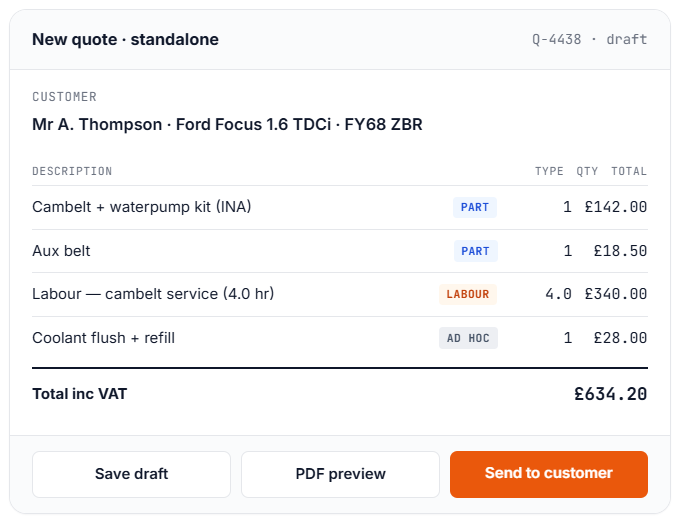
Need to quote work that isn’t tied to an inspection? Use the standalone quote builder at Finance → Quotes. Build the quote from parts, labour and ad-hoc lines, send a branded PDF and a portal link, and the customer accepts from their phone. One-click conversion to a work order when they’re ready.
Learn more about standalone quotes.
09 – Customer account types & payment terms
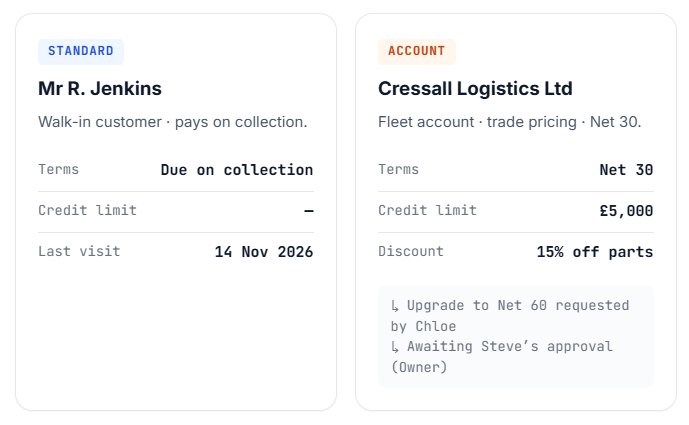
Walk-ins pay on collection. Account customers get terms.
Walk-in customers pay on collection. Account customers get extended terms. Torqueflow lets you mark a customer as Standard (pay on collection) or Account (Net 14, Net 30, whatever you set), with optional per-customer overrides. Account upgrades run through a request-and-approve flow, so Service Advisors can request but only Owners and Managers approve. Invoice due dates flow from the customer record automatically.
↳ Accounting & integrations
Your accountant sees the same numbers you do, live.
Two-way Xero sync. Reports your accountant actually wants. Pricing rules, labour codes, and branded templates configured once and applied everywhere.
10 – Xero integration
Connect once. Sales, purchases, and payments flow both ways.
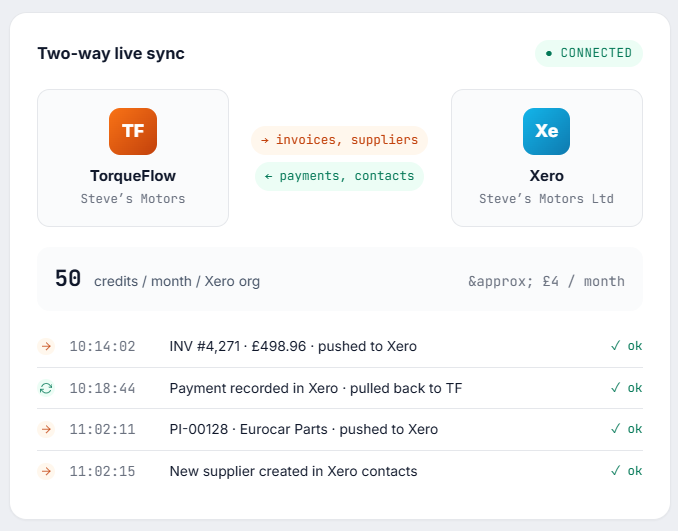
Connect Torqueflow to Xero in one click. Sales and purchase invoices flow into Xero automatically as you create them. Customer payments recorded in Xero flow back into Torqueflow within a few minutes. New customers and suppliers appear in Xero’s contacts. No CSV imports, no end-of-month reconciliation marathons.
The integration costs 50 Torqueflow Credits per month per Xero organisation, around £4, which covers the live sync and the webhook handling. Set up an accountant for an immediate notification when something fails to sync, and a bookkeeper for a daily, weekly or monthly digest.
11 – Financial reports
The reports you actually need, generated on demand.
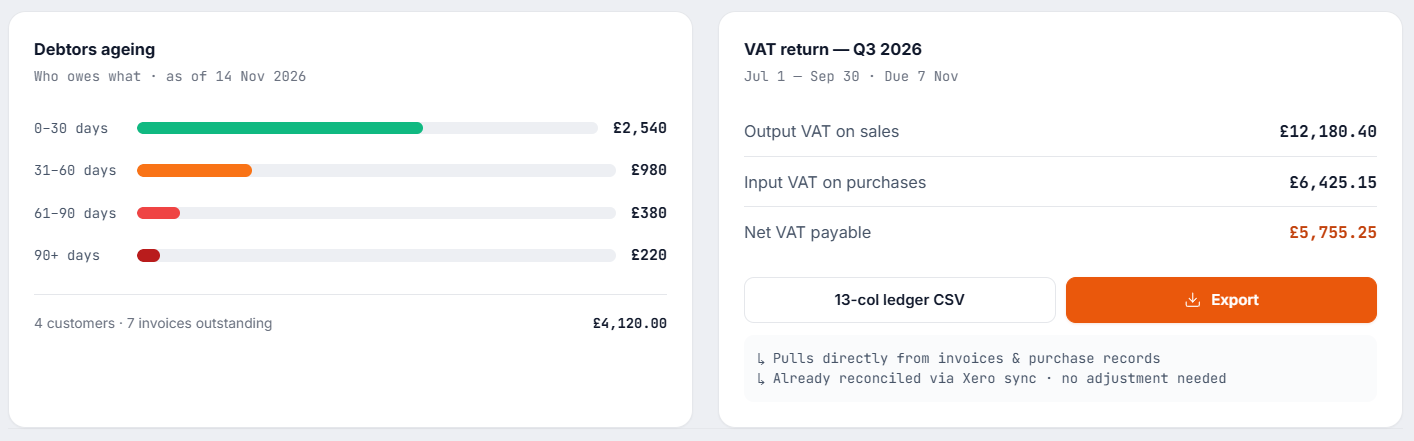
Pull sales, purchases, VAT, debtors, creditors, and technician commission. Export in CSV (detailed format or generic 13-column ledger), or download as PDF.
Sales Report
£48,220
October revenue
▲ 12% vs September
Purchases
£19,447
Outgoings by supplier
▼ 4% vs September
VAT return
£5,755
Q3 2026 net payable
Filing ready
Debtors
£4,120
Outstanding receivables
2 over 60 days
Creditors
£2,880
Due to suppliers
Next due 28 Nov
Technician commission
£1,840
Paul, Oct labour share
CSV export ready
12 – Labour pricing & markup
Price the way your garage actually prices.
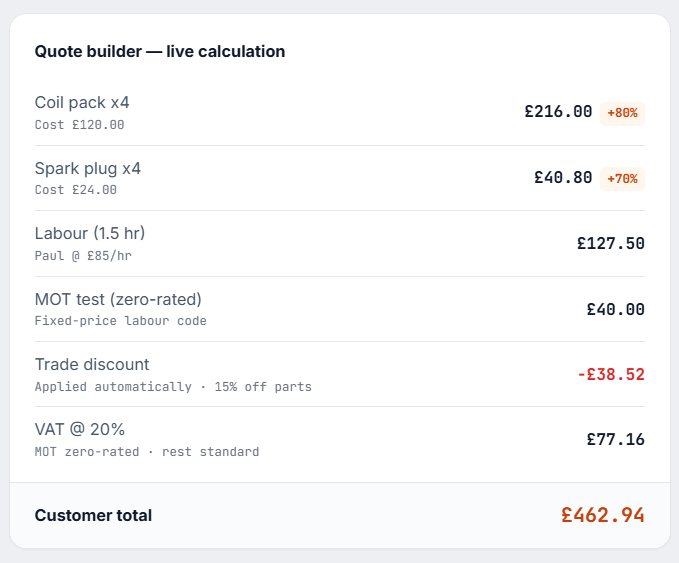
Labour codes – hourly or fixed-price (e.g. “Van Service – £129”). Each carries its own VAT rate, taxable flag, and nominal code, so MOT testing can be zero-rated and a cosmetic detail can be standard-rated, without thinking about it again.
Labour rates – per-technician or flat. Parts markup – default percentages applied automatically with per-line override. Discount rules – customer-level or job-level, trade vs retail. Configure once, applied everywhere.
13 – Invoice templates & branding
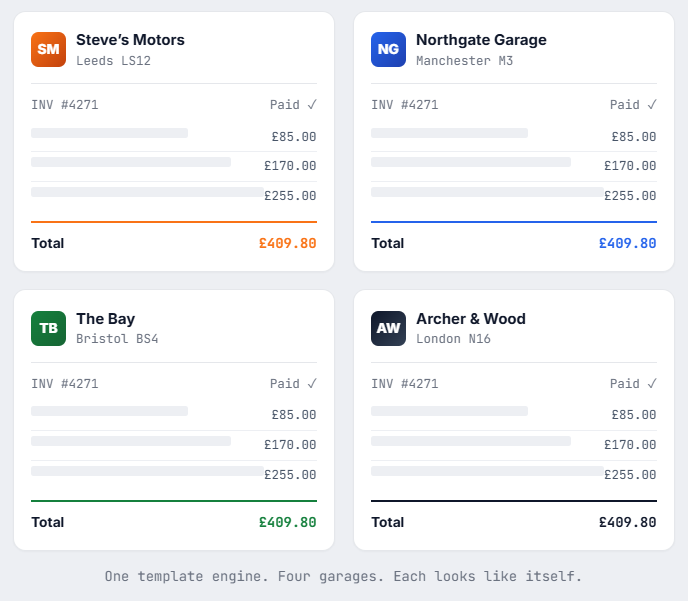
Looks like your garage, not like a software package.
Logo, colours, address, registration and VAT numbers, payment terms, bank details, custom footer text. Set it up once and every invoice that leaves your system looks consistent – whether emailed, viewed in the portal, or printed at the desk. Dual-copy PDFs available for the front desk.
Part of the whole system
Invoicing is one job. Torqueflow does the rest too.
The garage invoice software sits at the centre of a full garage management system. The booking diary, job cards, MOT reminders, parts and stock all live in the same place – one system for UK workshops that would otherwise juggle three.
It’s cloud-based, so you log in from any browser – on the ramp or at the counter.
The real difference
Most garage management systems bolt on basic invoicing as an afterthought.
Torqueflow builds finance into the workflow. A job doesn’t just generate an invoice. It carries the full financial picture from quote to payment, syncs to Xero so your accountant sees it live, and tracks every cost along the way.
Some people call it a garage invoice system, others call it garage billing software. Whatever the label, the point is the same. When your accountant asks “what was your parts cost ratio last quarter?”, you don’t shrug. You pull the report. Most garage management software in the UK can’t say that, and nor can the bigger management platforms.
Frequently asked
Things people ask before they switch.
Quick summary
The one-page version.
|
What |
How |
|---|---|
|
Generated from completed work orders. Re-label as Receipt once paid. Optional dual-copy PDFs. |
|
|
Purchase invoices |
Internal PI reference + supplier number, linked to jobs. |
|
AI invoice scanning |
Email, upload, or snap. AI extracts the lines, you review and confirm. |
|
Online card payments |
Stripe Pay Now and statement links + TakePayments card terminals. |
|
Customer statements |
Per-customer or all-outstanding, PDF / CSV / email, with aging buckets. |
|
Credit notes & refunds |
Cancel mistakes when no payment exists. Frees the work order. |
|
Void invoices |
Online via Stripe/PayPal, or recorded manually at the desk |
|
Quotes |
Inspection-findings approval AND standalone quote builder. |
|
Customer account types |
Standard or Account, with per-customer payment-term overrides. |
|
Disposal fees |
Auto-applied per part category. Tyre, oil, refrigerant. |
|
Xero integration |
Two-way sync of invoices and payments. 50 credits/month. |
|
Reports |
Sales, purchases, VAT, debtors, creditors, commission. CSV exports. |
|
VAT |
Per-line, per-code, with zero-rated MOT and override flexibility. |
|
Branding |
Custom templates and dual-copy PDFs. |
See it on your own numbers
Garage invoice software only proves itself on real jobs. Book a 20-minute demo and we’ll run your kind of work through it: a sales invoice off a job card, a card payment, a Xero sync, a VAT report. The setup process takes most garages under an hour, and our UK support team gets you live.