Multi Location Garage Software: Managing Multiple Workshops from One System
Running one garage is hard enough. Running two or three on separate systems is a full-time admin job on top of the actual work. Multi-location garage software puts every branch on one dashboard so you can manage multiple garages without doubling your office staff.
The jump from one location to two is where most garage management systems break. Your first site runs on Torqueflow or TechMan or whatever you chose. Your second site gets its own login, its own customer database, its own schedule. Now you’ve got two systems that don’t talk to each other. A customer who visits your Exeter branch has no record at your Plymouth branch. Your inventory doesn’t sync. Your revenue reporting means logging into two dashboards and adding up the numbers in a spreadsheet.
Multi-location garage software is one system across all your garage locations. Shared customer records, centralised reporting, per-site scheduling, and the ability to manage every location from one interface without driving between them.
Why separate systems break at two locations
Most garage owners who open a second site start by copying what worked at the first one. Same software, new account. It feels logical. Then the problems stack up.
Customers don’t transfer. Mrs Patterson services her Corsa at your Exeter branch. She moves house. She calls your Plymouth branch to book. They’ve never heard of her. No service history, no vehicle records, no customer history. She’s a new customer at a garage she’s been loyal to for three years.
With multi-location garage software, the customer record is shared across all locations. Her full history, every job, every invoice, every vehicle, every advisory travels with her. Whichever branch she visits, the team knows who she is.
You can’t see the full picture. How’s the business doing? With separate systems, you log into two dashboards. You export two revenue reports. You add them up manually. You compare them in a spreadsheet. And by the time you’ve done that, the numbers are a day old.
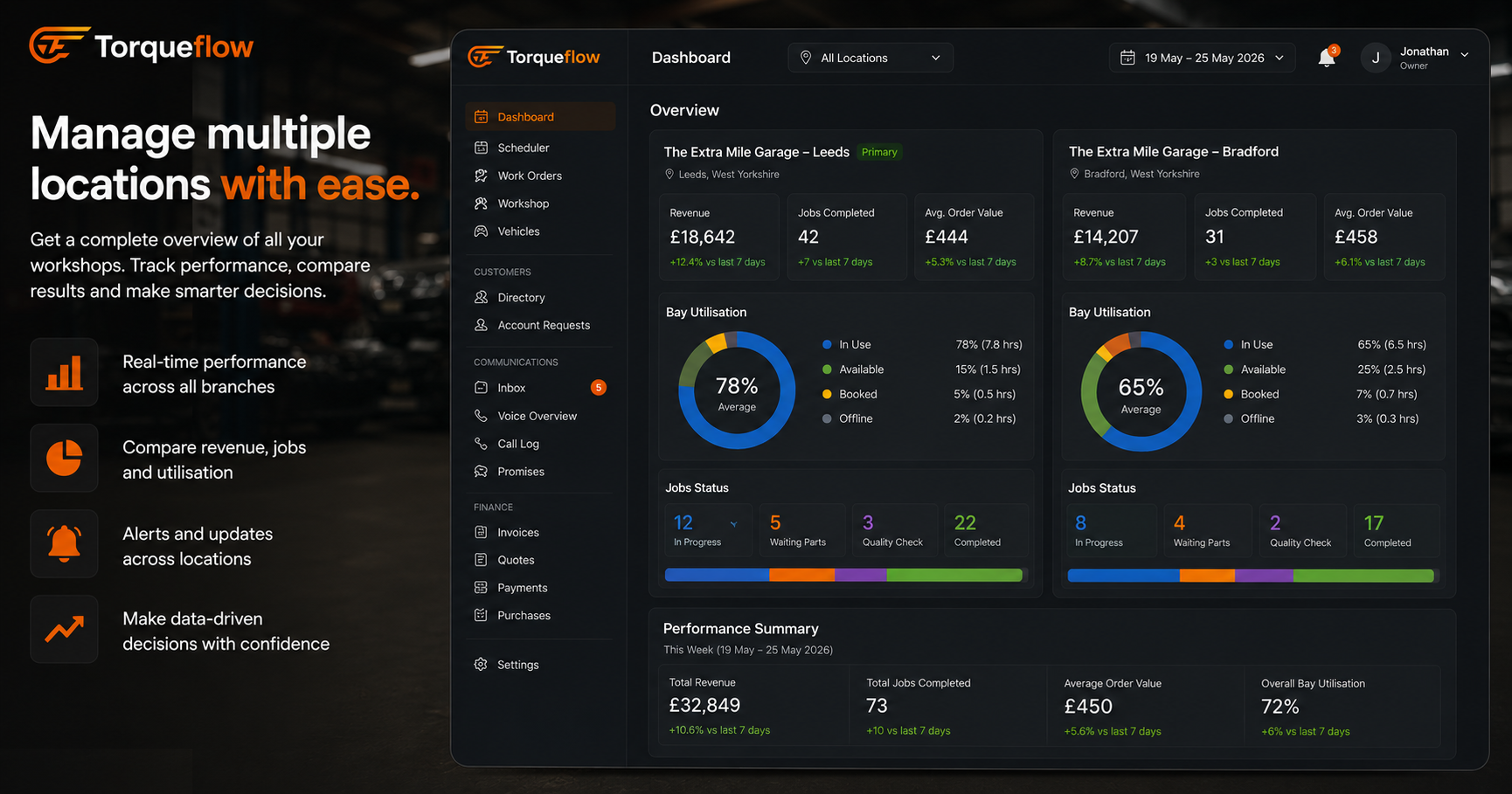
One system gives you complete visibility across all garage locations from one dashboard. Revenue per branch, bay utilisation per site, technician productivity per location. Real-time, not reconstructed from exports.
Inventory is siloed. Your Exeter branch has 6 sets of front pads on the shelf. Plymouth is out and has ordered more from the supplier. With separate systems, nobody knows. With shared inventory visibility, you can transfer stock between locations before ordering more. That’s margin you’re currently wasting.
Standards drift. Your first location runs your way. Your second location starts running their way. Different job card templates. Different customer communication. Different processes. Within six months, customers get a different experience depending on which branch they walk into. Multi-location garage software enforces consistent operations through shared templates, standardized workflows, and the same process at every site.
What multi-location garage software gives you
One dashboard for all garage locations
The owner or operations manager sees every location on a single screen. Today’s jobs at Exeter. Today’s jobs at Plymouth. Revenue comparison. Bay utilisation. Open invoices. Escalations. You switch between sites with one click. No separate logins. No separate browser tabs.
This real-time visibility is the difference between managing your branches and guessing how they’re doing.
Shared customer and vehicle records
A customer record belongs to the business, not the branch. Service history, vehicle records, invoices, communication logs, and customer visits are visible at every location. A customer who books at any branch gets the same level of insight from the team looking after them.
Per-location scheduling and team management
Each branch has its own schedule, its own bays, its own technicians. The AI phone receptionist for each location has its own voice persona and knowledge base. But you manage it all from one place. You can assign roles and permissions per team member per location. A technician at Exeter only sees Exeter’s jobs. The owner sees everything.
Centralised reporting and performance data
Revenue per location. Average job value per branch. Technician productivity per site. Booking conversion rates. No-show rates. All in one reporting interface. Spot which branch is underperforming before it becomes a problem. Identify which location should be your template for scaling the next one.
Consistent customer experience across branches
Automated reminders, aftercare messages, and status updates work the same at every location. A customer at your Plymouth branch gets the same WhatsApp updates as a customer at Exeter. Consistent service builds trust in the brand, not just the individual branch.
Inventory visibility across locations
See stock levels across all garage locations in one view. Know what’s on the shelf at each branch. Transfer stock between sites instead of ordering duplicates. This is particularly valuable for fleet work and high-volume parts like filters, pads, and discs.
Scaling from two to three locations (and beyond)
Adding new locations should be a configuration task, not a migration project. In good multi-location garage software, onboarding a new branch means creating a new location in settings, adding the team members, setting up the schedule and bays, and connecting the phone number. The customer database, the templates, the workflows, the accounting integration all carry over. The new branch is live in a day.
If your current system makes adding a location feel like starting from scratch, it wasn’t built for multi-site garage operations. It was built for one site and forced into handling two.
For garage groups and automotive businesses scaling across the UK, the system needs to be scalable from 2 locations to 10 without a pricing cliff. Per-location fees that double your cost every time you add a branch will cap your growth. Look for flat or tiered pricing that rewards scaling, not penalises it.
What to check before committing
- Shared customer records across all locations. Not synced nightly. Shared in real time. If a customer calls one branch about a job done at another, the team should see the full history immediately.
- One dashboard for all branches. With branch-wise filtering. The owner sees everything. The branch manager sees their site. The technician sees their jobs.
- Per-location scheduling. Each site has its own bays, its own technicians, its own calendar. The AI phone booking routes to the correct location based on what the caller asks for.
- Role-based permissions. Assign roles per person per location. A service advisor at Exeter shouldn’t be editing Plymouth’s invoices.
- Centralised reporting. Revenue, job volume, and performance data across all locations in one view. Exportable. Filterable by branch, date range, job type.
- Single accounting integration. One connection to Xero or Sage that handles invoices from all locations with the correct entity mapping. Not one integration per branch.
- Cloud-based. Desktop software with a server per site is not multi-location software. It’s single-location software installed twice. Cloud-based means one system, accessible from anywhere, always in sync.
- Pricing that doesn’t punish growth. Check the per-location cost. Some systems charge a full subscription per branch. Others include multiple locations in the base price. The difference compounds fast.
See Torqueflow’s multi-location features →
Frequently asked questions
What is multi-location garage software?
A garage management system that runs multiple workshop locations from one platform. Shared customer records, centralised reporting, per-site scheduling, and consistent operations across all branches. It replaces the approach of running separate software installations at each location.
Can customers visit any branch and keep their history?
Yes. In a multi-location system, the customer record and vehicle records are shared across all garage locations. A customer who visits your Exeter branch and then books at Plymouth has their full service history, invoices, and communication log visible to the team at both sites.
How does scheduling work across locations?
Each location has its own schedule with its own bays and technicians. The schedules are independent but visible from one dashboard. Online booking and AI phone booking route to the correct location based on the customer’s choice or the caller’s request.
Can I add new locations easily?
In a system built for multi-site, yes. Creating a new location is a configuration step: add the branch, add the team, set up bays and services. The shared customer database, templates, and workflows carry over. Most garage groups are live at a new location within a day. If the process takes weeks, the software wasn’t designed for managing multiple garages.
How much does multi-location garage software cost?
It varies. Some systems charge per location (effectively doubling your cost per branch). Others include multi-location support in the standard subscription or charge a modest per-site increment. Ask for the total cost at 2 locations, 3 locations, and 5 locations before committing. The pricing model matters more than the headline number.
What about fleet customers across locations?
Fleet customers with vehicles serviced at different branches need a single account with visibility across all sites. Good multi-location software tracks fleet vehicles wherever they’re serviced, with centralised invoicing and reporting for the fleet manager. This is a common requirement for automotive businesses handling contract work.
One business, one system
If you’re running multiple garages on separate systems, you’re paying for the inconvenience of not being able to see your own business clearly. Multi-location garage software gives you complete visibility, shared customer records, consistent operations, and the ability to scale to new locations without starting over. The admin overhead of managing multiple garages should go down as you grow, not up.
Torqueflow supports multi-location garage management with shared customer records, per-site scheduling, centralised reporting, and AI phone answering per branch. All-in-one, one subscription.