Garage Invoicing Software: What UK Workshops Actually Need in 2026
Most garage invoice software was built in 2010 and it shows. Clunky templates, no link to the job card, and you’re still typing in supplier invoices line by line. There’s a better way to manage your business.
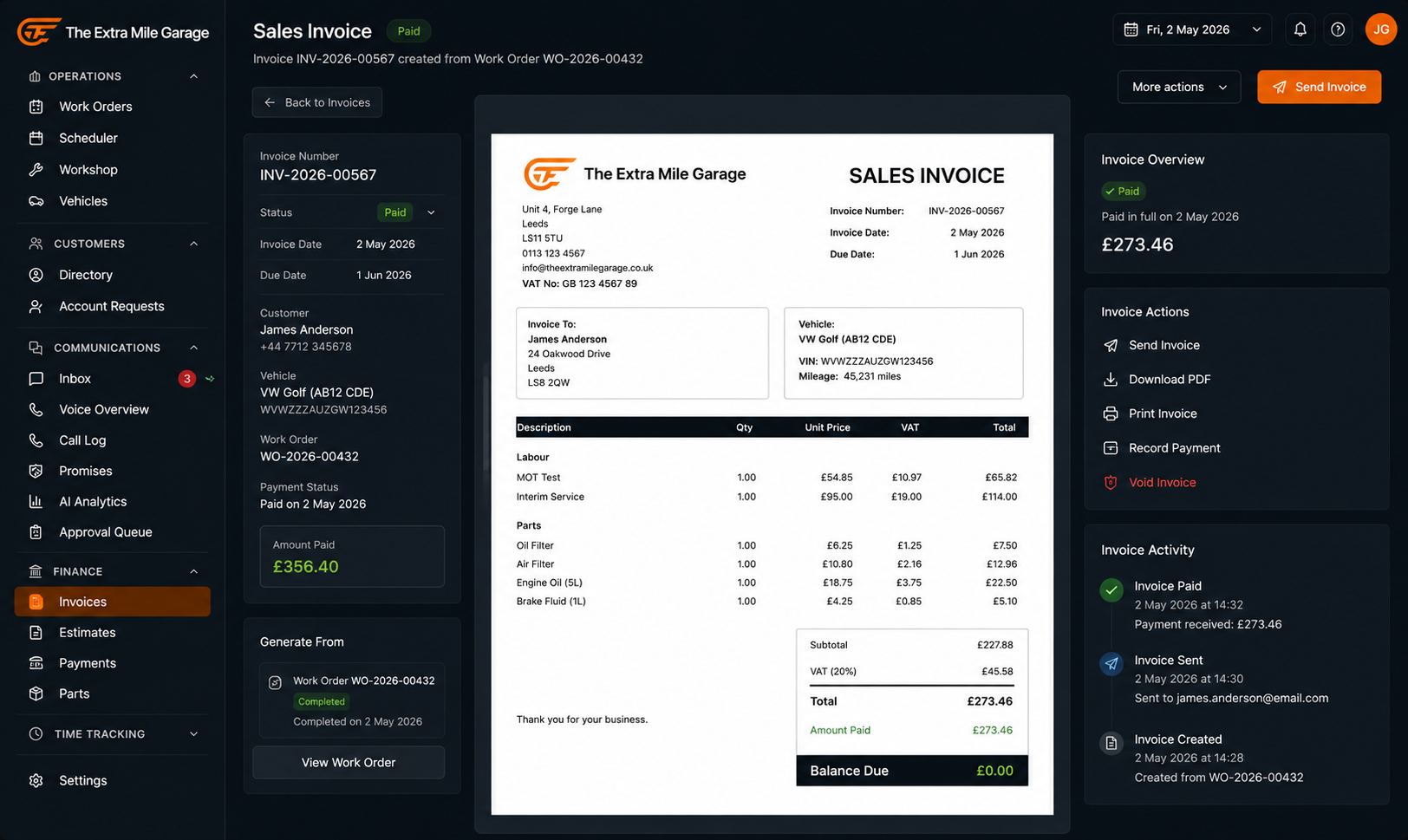
If you run an independent garage in the UK, invoicing isn’t optional. Every job needs a sales invoice. Every supplier delivery needs a purchase invoice. VAT needs to add up. And at the end of the quarter, your accountant needs numbers that make sense for HMRC.
But invoicing in most garages is still painfully manual. Someone types the labour lines and parts into a template, checks the VAT, emails or prints it, and hopes the customer pays within 30 days. That’s before you even get to the supplier side, where motor factor invoices arrive as PDFs, paper slips, or emails and need typing into the purchase ledger.
Garage invoicing software exists to eliminate that manual data entry. The best versions in 2026 go further: they connect invoices to work orders, pull parts and labour from the job card automatically, handle VAT returns, send invoices directly to customers via email or WhatsApp, and let you take payments directly from the invoice. Some now use AI to scan supplier invoices so you never type a purchase invoice again.
This guide covers what to look for, what to avoid, and what’s actually available for UK independent garages right now.
What garage invoice software actually needs to do
Not every invoicing tool is built for a workshop. Generic accounting packages (Xero, QuickBooks, FreeAgent) handle invoices, but they don’t know what a work order is. They can’t pull parts from a job card. They don’t link an invoice to customer vehicles or service history.
A proper garage invoice system needs to do the following.
Generate invoices from work orders
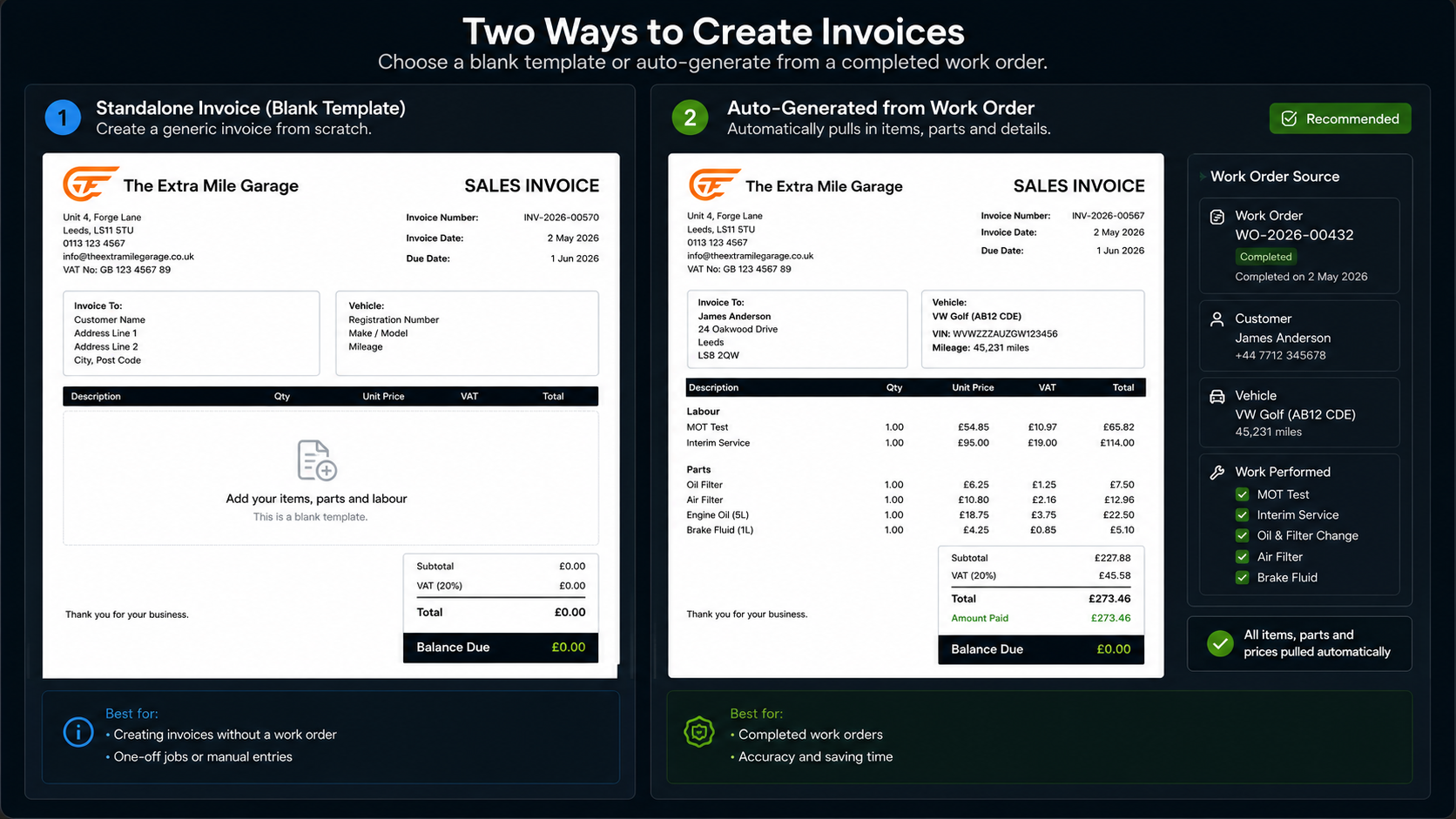
This is the baseline. When a job is complete, the invoice should build itself from the work order. Labour lines, parts used, any extras. No retyping. The mechanic closes the job, the service advisor reviews it, and the invoice is ready to send. If your system makes you type the same information twice, it’s already costing you time.
Handle both sales and purchase invoices
Sales invoices go to your customers. Purchase invoices come from your suppliers. Most garage software handles sales invoices well enough. But purchase invoice management is where garages lose hours every week. A motor factor delivery with 30 line items still gets typed in by hand in most workshops.
The best tools handle both sides. And in 2026, the best ones use AI to scan supplier PDFs and extract every line automatically, saving both time and typos.
Support UK VAT properly
VAT isn’t optional and it isn’t simple. Your system needs to handle standard rate, reduced rate, zero rate, and exempt items on the same document. It needs to produce returns that your accountant can hand to HMRC without reformatting. And it needs to handle the edge cases: part-exchange credits, goodwill discounts, warranty work with no customer charge.
If the software was built for the US or Australian market and bolted on UK VAT as an afterthought, you’ll find out when your first return doesn’t balance.
Let you customise invoice templates
Your invoice should look like it comes from your garage, not from a software company. At minimum you need your garage’s logo, your company registration details, your VAT number, and your payment terms on every invoice. Better systems let you customise the layout, add notes per invoice, and personalise the email that goes with it.
Templates matter more than people think. A professional-looking invoice gets paid faster than one that looks like it was made in a spreadsheet.
Connect to your accounting software
If your system doesn’t talk to Xero, Sage, or QuickBooks, someone is double-entering everything. That’s not a workflow. That’s a punishment. The integration should push sales and purchase records, payments, and credit notes to your accounting package automatically. No CSV exports. No manual reconciliation.
Track payments and chase outstanding balances
Knowing who owes you money shouldn’t require a phone call to the bookkeeper. Good software shows outstanding balances at a glance, lets you send automated payment reminders by email or SMS, and records partial payments against the right invoice. The ability to track what’s paid, what’s overdue, and what’s been promised “next week” for three weeks running is what stops cash flow from becoming a crisis.
Pull from customer and vehicle records
When you invoice Mrs Patterson for her Corsa’s brake work, the invoice should already know her name, address, vehicle registration, mileage, and the customer information from her record. It should link back to the service history so anyone can quickly access what was done and when. This isn’t a nice-to-have. It’s how you avoid billing errors and keep existing customers coming back.
Where most garage invoicing systems fall short
Search for “garage invoicing software” and you’ll find page after page of small, single-purpose tools. They generate an invoice. They print it. Job done.
Here’s what they typically miss:
No connection to the workshop. Standalone tools don’t know what jobs you’re running. There’s no link between the bill and the work order, the parts used, or the bay schedule. You’re maintaining two separate systems and hoping they match.
Inventory management is an afterthought. When a part goes on an invoice, your stock level should update. Most standalone invoicing tools don’t track parts inventory at all. You find out you’re out of brake pads when the mechanic walks to the shelf, not when the system warns you.
No customer relationship management. An invoice is a touchpoint. It’s a chance to remind the customer their MOT is due in two months, or that the advisory from the last inspection needs attention. Standalone tools treat the transaction as finished. Good garage management and invoicing software treats it as the start of the next one.
Reporting tools are basic or missing. If you can’t see your revenue by job type, your margins by service category, or your average invoice value this month vs last month, you can’t make informed business decisions. Financial reporting in most of these tools is limited to “list of invoices” and “total outstanding.”
What AI invoice scanning changes
The purchase invoice side of the equation is where UK garages lose the most time. And it’s where AI makes the biggest difference.
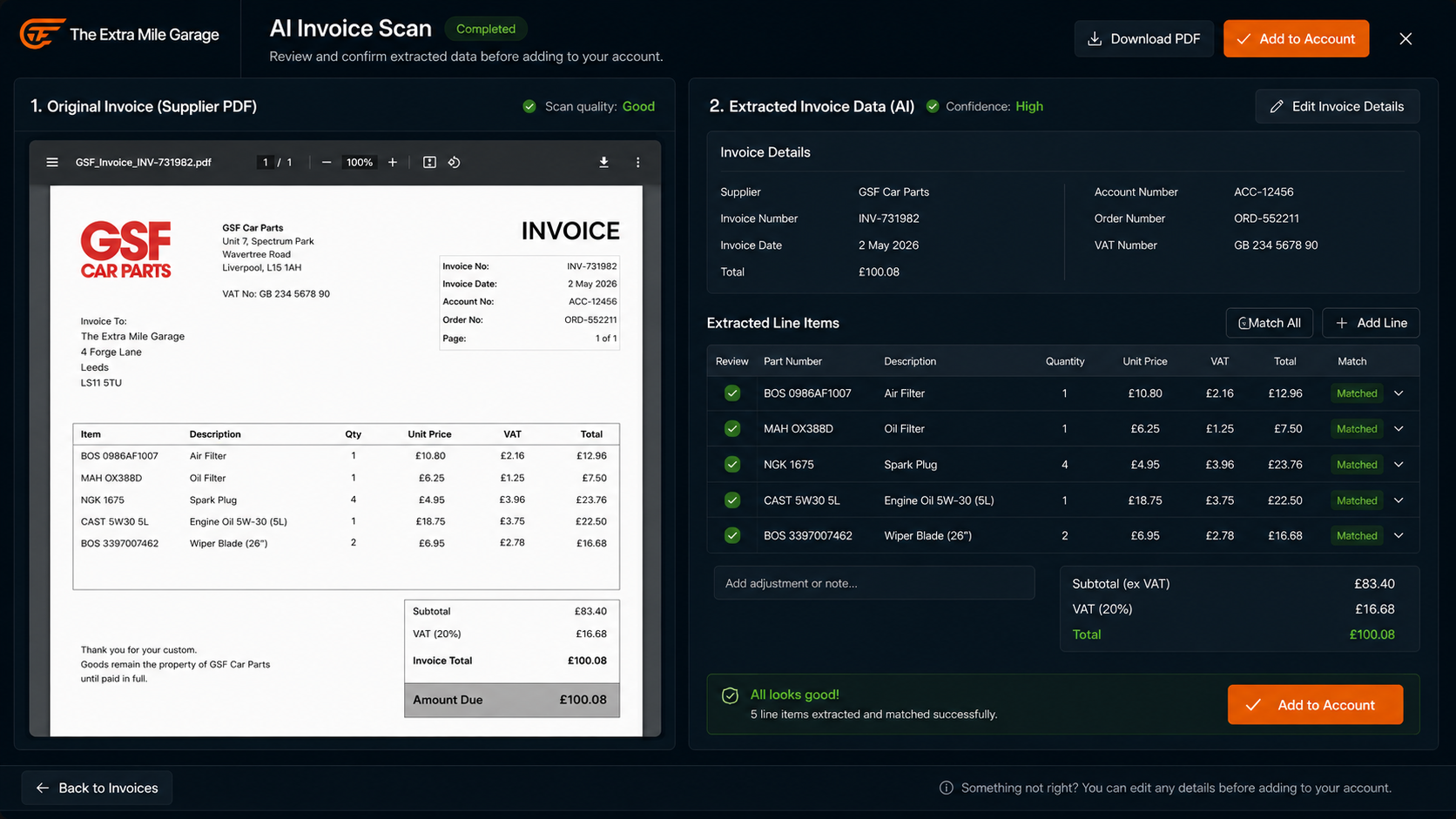
Instead of typing every line from a motor factor PDF, you forward the email or snap a photo. The AI extracts the supplier, every part number, every quantity, every price, the VAT, and the totals. You review it on a side-by-side screen and click Confirm.
30-60 seconds instead of 3-5 minutes per invoice.
It handles trade-counter receipts, credit notes, and duplicate detection. It flags totals that don’t add up before you confirm. It matches suppliers and parts against your existing records so you don’t create duplicates.
This is the single biggest time-saver in modern workshop software. If your current setup still has someone typing in supplier documents by hand, that’s the bottleneck to fix first. A busy independent vehicle workshop processing 5-10 supplier invoices a week is burning 30-50 minutes on manual data entry that AI handles in under 5.
Read more about AI invoice scanning →
What’s available for UK garages in 2026
The market breaks into three categories.
Standalone invoicing tools. Products like Garage Invoice Professional, Small Garage SG1, and Onyx focus specifically on invoicing for auto repair workshops. Small Garage SG1 is popular with 1-2 bay operations because it’s simple and cheap. These tools cover the basics: generate an invoice, add your garage’s logo, print or email it. They’re limited once you need purchase invoices, stock tracking, scheduling, or customer communication.
All-in-one garage management software. Products like Torqueflow, Garage Hive, and TechMan bundle invoicing into a complete garage management solution. Each job generates its own bill from the work order, connected to customer vehicles and service history, and synced to your accounting package. The trade-off used to be complexity, but cloud-based software in 2026 has caught up on ease of use. If you already run a management system, your invoicing should live inside it.
Generic accounting software. Xero, Sage, QuickBooks. Excellent for accounting, useless for garage-specific workflows. No work orders, no job cards, no bay scheduling, no MOT reminders, no DVLA lookups. You’ll still need garage software on top, and then you’re back to the integration question. These work best as the accounting backend that your workshop system pushes data into.
What to check before you choose
- Does it generate invoices from work orders? If not, you’re typing everything twice.
- Does it handle purchase invoices? Not just sales. The supplier side is where you lose the most time.
- Does it integrate with Xero or Sage? And properly, not via CSV export.
- Can you send invoices directly to customers by email and WhatsApp?
- Can you take payments directly from the invoice (card link, payment page)?
- Is there AI invoice scanning for supplier documents? This saves you 30-50 minutes a week.
- Can you send automated service reminders and MOT reminders by email and SMS? Billing and customer retention should be connected.
- Can you customise templates to match your branding?
- Is the setup process straightforward? You shouldn’t need a consultant for a week.
- Is there telephone support and customer support from a UK team?
- Are there additional fees per user, per invoice, or per integration? Or is it one price that covers everything?
Does it work on a tablet and phone? Your mechanics aren’t at a desk.
- *
FAQ
What is the best garage invoicing software in the UK?
It depends on your size. For a 1-bay startup, Small Garage SG1 is the easiest to use and cheapest entry point (it’s a standalone tool, not a full workshop system). For garages with 2+ bays that need scheduling, customer communication, and purchase management alongside sales billing, an all-in-one platform like Torqueflow covers everything in one place. It connects each job to its paperwork, handles AI scanning for supplier documents, and integrates with Xero and Sage.
Do I need separate invoicing software if I already use Xero?
Xero handles the accounting side but doesn’t know what a work order is. You still need garage-specific software to generate bills from jobs, track parts, and link records to customer vehicles. The right approach is a workshop tool that syncs directly to Xero so you’re not entering data in two places.
How much does garage invoicing software cost?
Standalone tools range from free (limited features) to £30-50/month. All-in-one systems typically run £50-150/month depending on features and number of users, with no additional fees per document. Some offer a free trial download or trial period so you can test before committing. Look for excellent value for money rather than the cheapest option. The cheapest tool that makes you type purchase invoices by hand is more expensive than the tool that scans them in seconds.
Can I send invoices directly to customers from the software?
Yes, any decent system lets you send directly to customers by email with one click. Better systems also send via WhatsApp and include a payment link so the customer can pay immediately. You can personalise the message and customise the invoice template with your branding.
What about VAT returns?
Your system should track VAT on every sales and purchase record and produce a summary that your accountant can use for HMRC submissions. Some systems integrate with Making Tax Digital directly. At minimum, the data should export cleanly to Xero or Sage where your accountant handles the VAT returns filing.
Is it worth switching from paper invoices or a spreadsheet?
Yes. A small independent garage doing 20 jobs a week spends roughly 3-5 hours a week on manual invoicing if they’re using paper or Excel. Proper software cuts that to under an hour, gives you financial reporting you can actually use, and stops invoices from falling through the cracks. The setup process typically takes a day, not weeks. Your existing customers and vehicle records can usually be imported from a CSV.
Does garage invoicing software track parts and inventory?
Standalone tools generally don’t. All-in-one systems do. When a part goes on a work order and then onto the bill, your inventory management updates automatically. You can see what’s in stock, what needs reordering, and what your parts margin looks like without checking the shelf.
The bottom line
Your options range from simple generators to complete workshop systems that handle every financial touchpoint. The right choice depends on your size, your specific requirements, and whether you want invoicing as a standalone tool or as part of a system that also runs your scheduling, customer communication, and workshop operations.
If you’re still typing supplier invoices by hand, start there. AI invoice scanning alone will save you time every week. If your invoicing is disconnected from your work orders, that’s the second fix. An easy to use system that connects billing to everything else in the workshop is worth more than a standalone tool and a folder full of workarounds.
Torqueflow is garage management and invoicing software built for UK independents. AI invoice scanning, automated reminders, Xero integration, and every invoice linked to the job it came from.